
QR Code Scams: How to Tell if a QR Code Is Safe
Last reviewed: October 2026
The short answer: A QR code is safe to scan only if you trust where it came from and the website it opens matches what you expected. Before you tap, preview the web address your phone shows. Be suspicious of codes stuck over other codes, codes in unsolicited emails or letters, and any code that leads to a login page or a payment request. To check a code without opening it, scan it with PhishGlass.
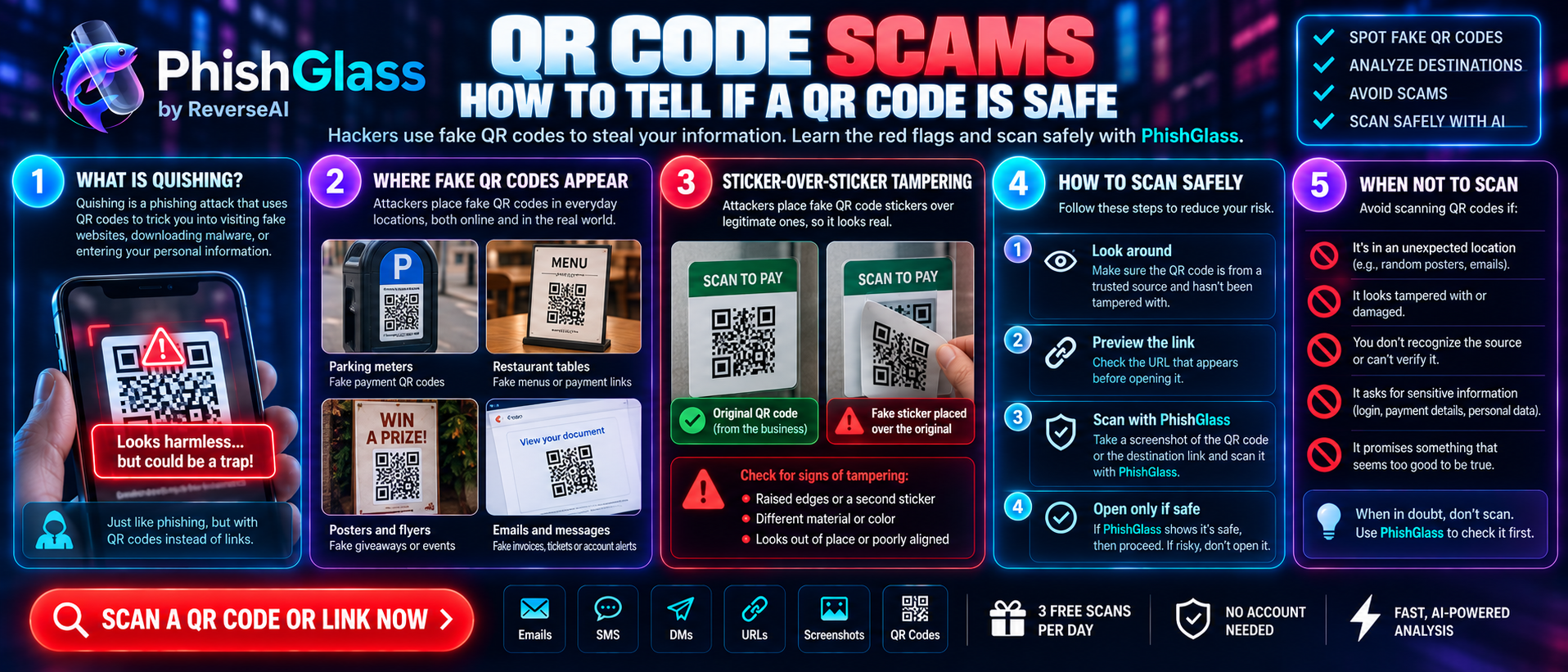
QR codes are handy because you don't have to type anything. That's exactly what makes them attractive to scammers. A QR code is just a picture, and you can't read the web address inside it with your eyes. That means a malicious code looks identical to a harmless one.
Scams that use QR codes are often called quishing (QR phishing). This guide explains how they work, how to spot them, and how to scan safely.
Where fake QR codes show up
Scammers place malicious codes anywhere people expect to scan something:
Parking meters and car parks
A fake sticker is placed over the real payment code, sending drivers to a fake payment page.
Restaurant tables and menus
A replaced code leads to a fake menu or payment form.
Emails
A "security update" email with a QR code instead of a link, which helps it slip past email filters because there is no clickable link to scan.
Letters and parcels
A fake delivery notice or a "missed payment" letter in your mailbox.
Posters and flyers
Fake giveaways, job offers, or "free Wi-Fi" signs in public places.
Text messages and social media
Codes shared as images so that links cannot be inspected.
Fake support or two-factor prompts
A message claiming you must scan a code to "re-verify" your account.
The 6 warning signs of a QR code scam
The code looks stuck on top of another one
Run a finger over it. A sticker that peels, sits slightly raised, or has a different print quality from the sign around it is a red flag. On parking meters and signs, check whether the code has been placed over an existing one.
It arrived unexpectedly
A QR code in an email, letter or text that you did not ask for is suspicious, especially one claiming to be from a bank, a delivery company or your employer. Real organizations rarely need you to scan a code out of the blue.
It creates pressure
"Verify your account within 24 hours." "Scan to avoid a fine." Urgency is the same trick used in phishing emails and texts, now wrapped in a picture.
The web address doesn't match
After you scan, your phone usually shows the link before opening it. Check that it matches the company it claims to be from, and watch for shortened links, extra words and spelling changes.
It leads to a login or payment page straight away
A menu, a parking tariff or an event page should not ask you for a password or full card details in the first step. If a code sends you straight to a sign-in form, stop.
It asks you to download an app
Be careful if a code prompts you to install an app from a link or a page that isn't your phone's official app store. Install apps only from the official store, searched for by name.
How to scan a QR code safely
Use your phone's built-in camera or scanner
On iPhone, the Camera app shows a link preview. On Android, the camera or Google Lens does too. Avoid installing random "QR scanner" apps.
Read the preview before you tap
Look at the domain just before the ending (such as .com or .net). Does it match what you expected?
Think about the source
Is it a physical code in a spot that can be tampered with, or a code in a message you did not request?
Go to the official site yourself when money is involved
For parking, tickets or bills, open the company's official app or type the address into your browser instead.
Don't enter passwords or card details
on a page you reached through a code unless you're certain it's the real site.
Check it first if you're unsure
Use a checker such as PhishGlass to analyze the destination before you open it.
When not to scan
- A code that has been stuck over another one
- Any QR code in an email, text or letter you didn't expect
- A code that asks you to log in to an account you already use
- A code on a flyer or poster promising prizes, easy money or "free" anything
If you're unsure, find the same service through its official website or app instead.
The easy way: check a QR code with PhishGlass
Looking at preview links takes care and attention, and scammers count on you being in a hurry. PhishGlass is an AI-powered tool from ReverseAI that analyzes suspicious links, messages and QR codes for phishing, and gives you a clear risk score with advice on what to do.
To check a QR code:
- Take a photo or screenshot of the code.
- Upload or paste it into PhishGlass.
- Read the risk score and the reasons behind it.
- Follow the tips on whether to avoid it, report it or verify it another way.
PhishGlass is a helpful check, not a guarantee. For anything involving payments or accounts, confirm through the company's official channels.
What to do if you already scanned a suspicious QR code
- Close the page and don't enter anything.
- If you typed a password, change it right away from a trusted device and turn on two-factor authentication.
- If you entered card or bank details, call your bank using the number on your card.
- If you installed an app, uninstall it, run a security scan, and review your device's permissions.
- Report it. If it's a physical sticker, tell the business or authority that owns the sign, and report the scam to the authorities.
For more on reporting, see our guide to reporting fake pages.
Frequently asked questions
How can I tell if a QR code is a scam?
Check whether it's stuck over another code, whether it arrived unexpectedly, whether it creates urgency, and whether the web address your phone previews matches the real company. If it leads to a login or payment page straight away, stop and verify another way.
Can scanning a QR code hack my phone?
Simply scanning a code is usually low risk on a modern phone. The danger comes from what happens next: opening a fake login page, entering your details, or installing a malicious app. Preview the link before you open it.
What is quishing?
Quishing is phishing that uses QR codes. Instead of a clickable link, the scammer uses a picture of a code that leads to a fake website, which can help it avoid email filters and hide the destination from you.
How do I check a QR code before scanning it?
Look for signs of tampering, consider where it came from, and preview the link your phone shows. You can also analyze the destination with a tool such as PhishGlass before you open it.
Are QR codes in emails safe?
Be very cautious. A QR code in an unexpected email is a known phishing tactic. If the email claims to be from a company, go to its official website or app directly instead.
What should I do if I scanned a fake QR code?
Close the page without entering anything. If you shared a password or payment details, change the password, enable two-factor authentication and contact your bank. Then report the code.
Is there a safe QR code scanner app?
Your phone's built-in camera is usually the safest scanner, because it shows a link preview and doesn't need extra software. Avoid unknown scanner apps. For an extra check, analyze the link with PhishGlass.
Look before you scan.
A QR code is just a link in disguise. Spend a few seconds checking it, and you'll avoid most QR scams.
Check a QR code with PhishGlass